Stream Annke C800 4K PoE Turret Camera to Wasabi Hot Cloud
Cost-effective 4K Sony sensor IP camera with Hikvision-compatible FTP firmware. Follow our step-by-step setup guide below to stream footage directly to Wasabi Hot Cloud via FTP/S with Rilavek as the pipe — zero on-prem NVR required.
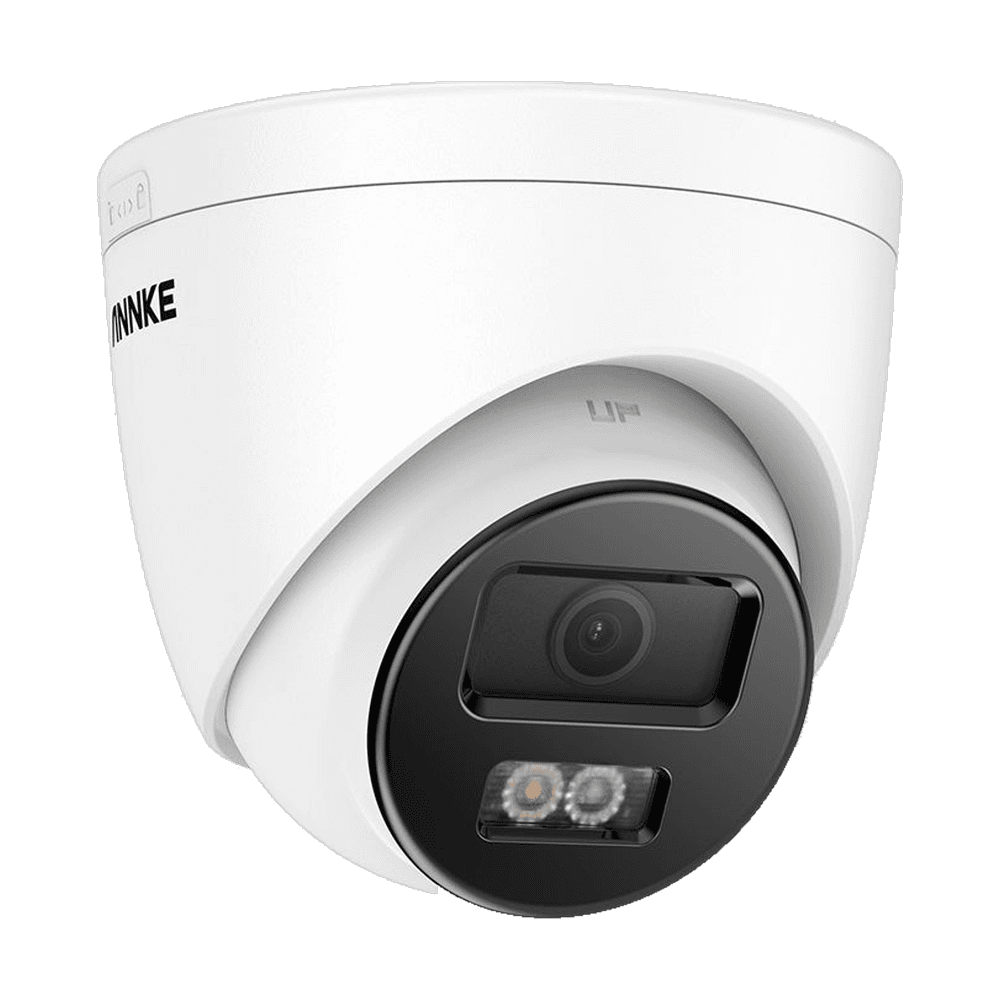
Your Annke C800 uploads footage offsite in real time directly to Wasabi Hot Cloud. Intruders cannot steal or destroy evidence by seizing on-prem recorder hardware.
Store Annke C800 recordings in Wasabi Hot Cloud on your own terms. Apply automated bucket lifecycle rules to roll over or archive clips after 30, 90, or 365 days.
Rilavek ingests native FTP/S streams from your Annke C800 and writes them directly to Wasabi Hot Cloud via multipart S3 PUTs with zero disk writes.


How to Stream Annke C800 4K PoE Turret Camera to Wasabi Hot Cloud
Follow these 6 steps to provision your object storage, configure Rilavek’s Data Store, Sender, and Ingestion Pipe, enter your camera firmware settings, and establish automated S3 retention rules.
Set Up Your  Wasabi Hot Cloud Bucket & Generate API Keys
Configure your target bucket and API credentials inside Wasabi Hot Cloud so Rilavek can stream motion clips and continuous video directly into your storage.
- Log into the Wasabi Management Console and click Create Bucket in your preferred region.
- Go to Access Keys in the left navigation and click Create New Access Key.
- Download or copy the generated API Key (Access Key) and Secret Key.
- Wasabi S3 endpoint format:
https://s3.<region>.wasabisys.com.
Add Your Data Store in Rilavek
In your Rilavek dashboard, navigate to Data Stores > New Data Store, select your provider, and enter your S3 credentials. Rilavek verifies the connection with an automated write-probe before saving.
Add New Data Store
Create a Camera Sender in Rilavek
Go to Senders in the Rilavek sidebar and click New Sender. A Sender represents the hardware identity of your Annke C800 4K PoE Turret Camera and generates a dedicated device-level password.
Create New Sender
Must be at least 6 characters, lowercase, start with a letter/underscore, and contain only letters, numbers, hyphens, or underscores.
Secure credentials will be automatically generated for this sender.
Sender Credentials
Create & Configure Your Ingestion Pipe in Rilavek
Go to Pipes in the sidebar and click Create Pipe. Configure the 4 core sections of your pipeline: General (Pipe ID), Inputs (FTP), Access Control (Sender permission), and Destinations (Data Store).
1General Settings (Pipe ID)
Every pipeline in Rilavek is assigned an immutable, globally unique Pipe ID (e.g. p_cctv9x). This ID acts as an isolated ingestion channel that segregates audit logs, real-time transfer metrics, and storage routing. It also forms the second half of your scoped camera FTP login username (username@p_cctv9x).
Pipe ID
Use this ID to identify this pipe in logs. Combine it with the sender username for complete authentication details.
2Inputs (FTP / FTPS Ingress)
The Inputs configuration defines how camera files enter Rilavek. Enabling the FTP Ingress input provides a persistent, high-availability ingestion server (ftp.rilavek.com) compatible with active and passive FTP modes, explicit TLS negotiation, and standard CCTV firmware video push routines.
Inputs
Enable inputs to receive data.
FTP Ingress
Endpoint enabled. Connect using your Sender credentials.
Example: cam_c800@p_cctv9x
Use the password configured for the specific Sender.
3Access Control (Sender Authorization)
Access Control prevents unauthorized uploads by enforcing a zero-trust boundary on the ingestion pipe. Only explicitly authorized Senders (such as Annke C800 4K PoE Turret Camera) can authenticate and stream video into this pipe. Any requests with unassigned credentials are rejected at the network edge.
Access Control
Restricts who can upload to this pipe.
Individual Senders
Grant or revoke pipe access for specific individual senders.
4Destinations (Target Cloud Storage Routing)
The Destinations section routes video clips to your target cloud storage provider. Linking your configured Data Store routes all received footage directly to your Wasabi Hot Cloud bucket (cctv-annke-recordings). Video files are committed on-the-fly via parallel multipart S3 PUTs without intermediate disk caching.
Destinations
This is where we send your files to.
Configure FTP, Motion Detection & Linkage Method in Annke C800 4K PoE Turret Camera Firmware
Open your camera's web configuration page in your browser at its local LAN IP address and complete the steps below:
Step 5AConfigure FTP Streaming Credentials
Click Configuration > Network > Advanced Settings > FTP.
Enter your Rilavek Ingestion Pipe parameters as indicated by the red annotations below.
ftp.rilavek.com (or your gateway IP 192.168.2.240).cam_c800@p_cctv9x (SenderUsername@PipeID).Wasabi Hot Cloud bucket.Step 5BConfigure Motion Detection (Area Settings)
Click Configuration > Event > Basic Event > Motion Detection.
To stream motion-triggered events instead of continuous 24/7 recording (saving cloud storage and bandwidth), configure your detection area and target filters as indicated by the red annotations below.
Step 5CConfigure Linkage Method (Upload to FTP)
Click Configuration > Event > Basic Event > Motion Detection > Linkage Method.
Check "Upload to FTP/Memory Card/..." so motion video clips stream to Rilavek as indicated by the red annotations below.
Annke Firmware Notes & Best Practices
Model-specific nuances, recommended settings, and verified workarounds for the C800
Annke C800 uses Hikvision-derived firmware. Do not include leading slashes in folder names if test fails.
Verify Ingestion
Click Test in your camera's FTP settings or trigger a test recording transfer. In your Rilavek dashboard, navigate to Pipes > your pipeline > Transfers tab to inspect incoming files as video clips stream into Wasabi Hot Cloud.
| FILE | SENDER | SIZE | DATE | STATE |
|---|---|---|---|---|
annke/c800/2026-09-10/ch01_143000.mp4 | cam_c800 | 18.4 MB | Sep 10, 14:30 | Success |
annke/c800/2026-09-10/ch01_142500.mp4 | cam_c800 | 21.2 MB | Sep 10, 14:25 | Success |
annke/c800/2026-09-10/ch01_142000.mp4 | cam_c800 | 19.7 MB | Sep 10, 14:20 | Success |
Common questions
Does the Annke C800 4K PoE Turret Camera require an on-site NVR to stream to Wasabi Hot Cloud?
No. The Annke C800 4K PoE Turret Camera has built-in FTP client firmware. It connects directly to Rilavek's cloud bridge on port 21, streaming video chunks into your Wasabi Hot Cloud bucket without requiring a local NVR or PC.
How does retention work on Wasabi Hot Cloud?
You define exact retention policies (e.g. 30, 90, or 365 days) directly in your Wasabi Hot Cloud bucket using standard S3 Lifecycle expiration rules. Footage is never auto-overwritten by proprietary cloud caps.
What happens if my internet connection drops?
If your C800 has a local MicroSD card installed, it records motion events locally and retries the FTP upload once connectivity is restored.
Stream Annke C800 4K PoE Turret Camera to Wasabi Hot Cloud
Create your free Rilavek ingestion pipe in seconds. No NVR hardware, no proprietary camera cloud subscriptions, and 100% data ownership in your private storage bucket.
Free plan includes 10GB of transfer. No credit card required.